
Borrower Records
This section explains how to register a new borrower and how to edit an existing borrower’s record. We begin with the policies that guide and govern the process.
 Printable Quick Guide: Borrower Records
Registration Policies
Getting a Card
A borrower must show proof of identification to register for library services. A government issued ID is preferred, such as driver’s license or MCP card. We do not record details of the ID.
Each borrower is given a free plastic library card and should sign on the back. There is a $2 replacement fee for lost or damaged cards, although cards which become worn or damaged through normal wear and tear can be replaced free of charge.
A library card provides access to the services of all public libraries in the province, including checkout of items, use of eLibrary services, and use of public computers.
A borrower can hold only one active card.
Registration is Paperless
Registration is recorded directly into Horizon. However if the circulation desk is busy, or if Horizon is down, then a patron can complete a Borrower Registration Form. The form must be shredded once details have been entered into Horizon.
If Horizon is down then do not provide a library card at this time. When Horizon is working again, check that the borrower does not already have an account and then register them in Horizon.
Registering Different Borrower Types
Children Under 13
A parent or guardian must apply for the child’s membership. If they do not have an ID present for the child then they can show an ID for themselves.
Use the child’s name. The parent’s name should be recorded in the ‘Parent/Guardian’ field of the borrower record. The parent’s email address should be used.
Children are issued a child library card which the parent must sign.
Young Adults (13-17 inclusive)
A young adult must apply for their own membership and show their own ID. If they don’t have ID then the ID of a parent or guardian who is present can be used instead.
Young adults are issued a regular library card. A young adult takes full responsibility for borrowed materials and must sign his or her card.
Talking Book Borrowers
The Talking Book audiobook collection is produced by the CNIB and housed at A.C. Hunter Library in St. John’s. To register as a talking book borrower a patron must have a CNIB number or a registration card signed by a doctor or registered nurse. A talking book borrower could be homebound, walk-in or non-resident.
Visitors from Out of Province
A visitor from out of province who wants to borrow items can be registered using a Temporary Card made of cardstock. Cards are available from Technical Services.
Visitors from out of province include tourists and people visiting their family.
A person who resides within the province is not a visitor and should be registered as a regular borrower. This includes a student at MUN or Grenfell.
Record the visitor’s temporary address first and the permanent address second.
Registering a New Borrower
Before registering a borrower check that they are not already registered.
Delinquent borrowers sometimes try to re-register rather than pay fines. Borrowers who have moved within the province sometimes don’t realize that their card is valid at all provincial libraries.
Searching for an Existing Record
 Video Guide: Searching for a Borrower
To check if a borrower is already registered, perform a borrower search. Go to the Checkout tab and press [F4] or select from top menu Borrower > Find Borrower.
| A pop-up window will appear: | 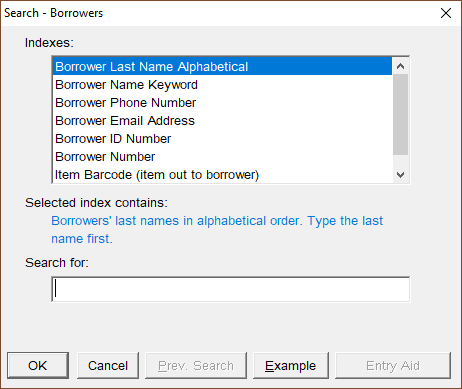 |
Normally you would search by name, although other indexes can be used.
| Type the last name first. For example: | 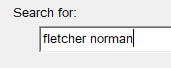 |
You don’t need to use capital letters. Use spaces to separate the first and last names.
The results display alphabetically, with an arrow pointing to the name closest in spelling to your search:
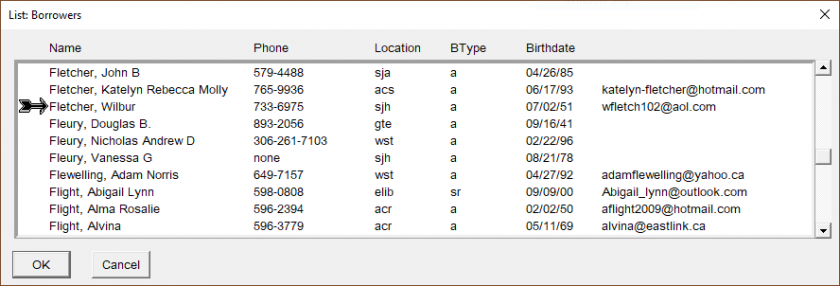
| For an unusual name you might need to only type the last name and first letter of the first name: | 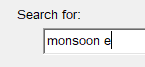 |
| For more common names it might help to type in the middle initial too: | 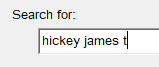 |
Advanced search techniques are useful if you think that a borrower record might already exist under a misspelled name.
* (asterisk) replaces zero or more letters. For example:
cor* will list borrowers whose last name begins with ‘cor’
? (question mark) replaces a single letter: For example:
perr?n will return results for perrin, perron and perryn
If the borrower already has a record then select it and click OK. Press [F6] or select from top menu Borrower > Edit Borrower to open the record. Confirm details and issue a new library card if necessary. See the section Editing a Borrower.
Creating a New Borrower Record
Printable Quick Guide: Borrower Registration
Video Guide: Registering a Borrower
If the borrower you are searching for is not found then you will need to register them.
First close both pop-up search windows:
-
-
- click on Cancel or press [Escape] to close the borrower list window
- click on Cancel or press [Escape] to close the borrower search window
-
You should now be back at the Checkou