
Checkout
This section explains how to check out items and how to renew them.
 Printable Quick Guide: Checkout & Renewal
Simple Checkout
 Video Guide: Simple Checkout
The checkout window automatically opens when you log on.
If you have closed it and need to open it again, click on  .
In the checkout window, scan the borrower’s card. If the borrower doesn’t have their card with them, ask for ID and search for the borrower.
Video Guide: Checkout Without Card
Horizon will show the borrower’s name in the checkout window.
To checkout each item scan its barcode, found on the back cover. Each checked out item appears in the checkout window, along with the due date and other information.
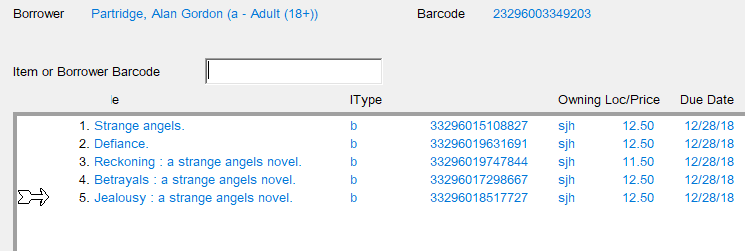
Remember to stamp the item with the due date shown.
The standard loan period is 3 weeks. Horizon might reduce this for high-demand items. Loans are normally extended by renewal.
Clear the Checkout Screen When Finished
When you have checked out all items to the current borrower, click on Clear before doing any more tasks in Horizon. This will remove the borrower’s details from the screen and prevent accidentally checking out other items to them.
If the Borrower Has Fines or Other Blocks
If a borrower owes fines then after scanning the borrower’s card a window will open showing their current blocks will display.blocks. TheThis blocksBlocks windowWindow prevents you from scanningchecking itemout barcodesitems until you have made a decision about the blocks. When you have made a decision selectclick on CKO to continue.
The section Fines and Blocks explains this.
All Items Out
Click on All Items Out to see the full list of items checked out to the current borrower.
Items checked out in the current session appear in blue text. Items checked out previously appear in black text.
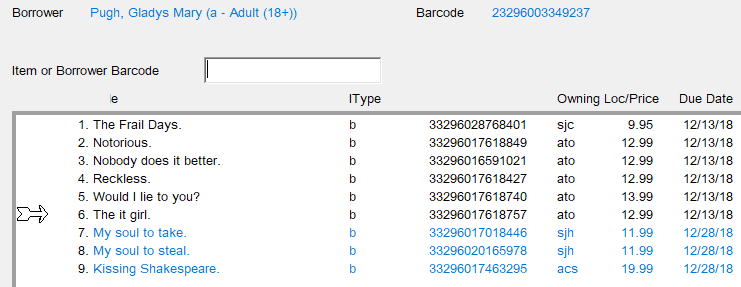
It is a good idea to view all items out during checkout because it allows an opportunity to renew items that are almost due for return soon.return.
If possible, it is also a good idea to check in any items being returned by athe borrower before checking out items to them. Doing thisThis will ensure that the list of all items out is up-to-date.
Non-Catalogued and Non-Circulating Items
Some books, such as Harlequins, are not and should not be catalogued. They can be loaned but the loan will not be recorded in Horizon. RecordSimply stamp a 3-week due date on the back of the item and keep a count of these items in the ‘Uncatalogued Items’ field of your daily stats.
You might have items at your site that aren’t catalogued but couldshould be. ExamplesFor includeexample titles that were added to the collection before automation, or donated newer items. These items can be added to Horizon, during checkout if time permits,permits. orIf otherwisethere's not time, add them when they are returned. The chapter about Adding and Editing itemsItems explains this.
Some items are not available for circulationcheck out to borrowers, and are restricted to in-libraryhouse use. These include reference books, encyclopaedias, almanacs and dictionaries. If you try to check out one of these items then Horizon will display a message telling you that the item cannot be loaned. SelectClick on Continue to close the message.
Changing the Due Date
Video Guide: Editing the Due Date
You can change the due date of an item that is checked out. To do this:that:
- open the checkout window
- scan the borrower’s card or search for them
selectclick on All Items Out- select the item or items
selectclick on Edit Item
If you have selected more than one item then Horizon will ask:
okay-
- "Okay to make a batch change?"
selectclick on OK
The current due date appears in the Due Date Field, in the format mm/dd/yy:
-
-
- change this to the required date.
selectclick on Save then Close.
Changing the due date should only be done at the time of first checkout,checkout. forFor example if a borrower is going to be away for longer than the standard 3-week loan period and it would be difficult for them to renew.
Do not give an extended loan period for items loaned from other locationslocations, nor for in-demand items.
The due date for overdue items cannot be edited. To extend the due date for an overdue item you must renew it.
Renewals
Video Guide: Renewing an Item through the Checkout
Borrowers can renew items in person, by phone or online. The new due date is usually 3 weeks from today, to match the standard 3-week loan period. period, Forbut itemspay withattention shorter original loan periodsto the newscreen duein datecase willit beis shortershorter.
Items Present
If an item has been brought back to the library then it can be renewed providing that there are no requests.
Items not Present
Video Guide: Renewing an Item Not Present
If an item has not been brought back then it can be renewed a maximum of 3 times before the borrower must return it. This is to ensure that the items has not gone missing. If the borrower returns the item and there are no other requests then you can renew it again for them.
VideoItems Guide:on RenewingLoan anfrom ItemOther Not Present
Locations
Items borrowed within the province by Inter-Library Loan can be renewed the same way as items borrowed from your location.
Items borrowed from out-of-province cannot be renewed.
Items Overdue
Video Guide: Renewing an Overdue Item
Overdue items can be renewed, and Horizon will calculate the fine owing as if the item was returned today.
VideoItems Guide:Lost Renewingor anClaimed Overdue Item
Returned
Lost and Claimed Returned items cannot be renewed. Those items must be checked in and any fees processed.
Items from the eLibrary
Items borrowed from the eLibrary, such as eBooks and audiobooks, cannot be renewed using Horizon, and do not appear in the borrower’s list of all items out. Borrowers must use the eLibrary system to loan, renew and request eMaterials.
Renewing One nor More Items
Video Guide: Renewing an Item through the Checkout
- open the checkout window
- scan the borrower’s card
- or for renewal-by-phone, search for them
selectclick on All Items Out- select the item or items that you want to renew
- select from top menu CKO > Renew
- or CKO > Renew All
Items,Items, if appropriate
- or CKO > Renew All
whenHorizonaskedwill‘ask "Are the Items Present?’"
IfWhen an item can beis renewed then its new due date will appearappears next to its title in the list of checked out items.
If the due date is for a reduced period then Horizon will let you know.
If an item cannot be renewed then Horizon will tell you.
Lending Policies
Video Guide: Borrowing & Renewal Limits
|
Type of Item |
Loan or Renewal Period |
Max # Renewals |
Max # Out |
|
book |
3 |
3 |
18 |
|
periodical |
3 |
1 |
12 |
|
dvd or blu-ray |
3 |
3 |
6 |
|
audiobook |
3 |
3 |
6 |
|
sound recording |
3 |
1 |
6 |
|
talking book |
3 |
3 |
6 |
Horizon will prompt you if you attempt to exceed the maximum number of renewals or the maximum number of items out.
The loan period might be automatically reduced by Horizon if an item is high demand.
Horizon actually allows twice the maximum number of books to be checked out to a patron. Why? Because staff might not have time to check in all returned items before checking out new items to a borrower.
Your site might use lower lending limits than Horizon allows.
Please tell your borrowers what your site’s policy is concerning the number of items that they may check out.