Other Guidance
Staff Portal
Guides to extended tasks, such as the Guidelines for Completing Cataloguing by Mail Forms, can be found in the staff portal.
Quick Guides
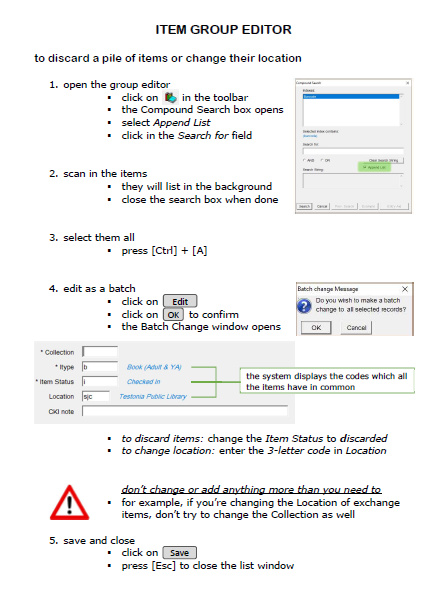
A set of printable quick guides have been created to accompany this online guide. Links to the quick guides appear throughout the sections.
Click on the name of a guide to view it in a new window:
|
Borrower Records
|
 |
 |
|
Borrower Registration
|
|
Checkin
|
|
Checkout and Renewal
|
|
Requests and Holds
|
|
Fines and Lost Items
|
|
Item Search
|
|
Adding an Item
|
|
Editing an Item
|
|
Item Group Editor
|
|
Circulation Notices
|
|
Horizon is Down
|
...or click here to view all 12 guides as a single document.
Video Guides
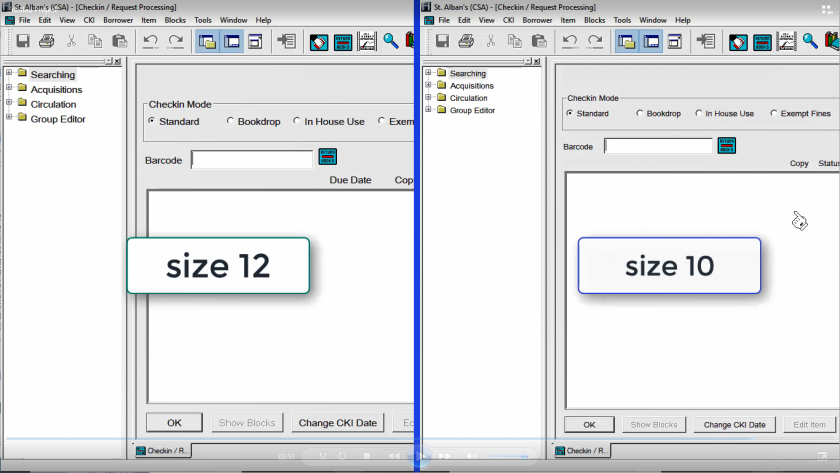
A collection of videos have been recorded that take you through all the key aspects of using Horizon at the circulation desk. They don’t have to be watched in order, but are listed here in a natural progression. Links to the videos appear through the sections.
The videos contain sound, so contact your regional office if you don’t have headphones or a speaker available.
Click on the name of a video to view it:
Logging into Horizon
Understanding the Interface
LoggingBorrower intoRecords
Horizon
Searching for a Borrower
Registering a Borrower
Editing Borrower Details
Duplicating a Borrower
Fixing a Self-Registered Borrower
Annual Details Check
Replacing a Borrower's Card
Deleting a Borrower
Registering a Temporary Borrower
UnderstandingCheckin
the
Interface
Simple Checkin
Checkin Modes and Options
Checkout
Simple Checkout
Checkout without Card
Editing the Due Date
Renewing an Item Through the Checkout
Renewing an Item Not Present
Borrowing & Renewal Limits
Requests & Holds
Placing a Hold Request
Viewing Requests by Borrower or Title
Placing a Request for Another Library
Requesting the Pull List
Blocks & Fines
Taking Payment for a Fine
Renewing an Overdue Item
Dealing with Lost Items
Item Search
Searching by Title
Searching by Author
Searching by Subject
Restricting a Search
Inter-Library Loans
Checkout an Item to Another Library
Receiving an ILL from Another Library
Adding & Editing Items
Adding an Item
Adding a Magazine
Replacing a Barcode
Editing Items from Checkin
Adding a Checkin Note to an Item
Using Item Group Editor
Tracing Items
Reports
Running Circulation Notices
Using Item Report for Advanced Searches
Troubleshooting
Horizon is Down
Starting Horizon
Logging into Horizon
Understanding the Interface
Borrower Records
Searching for a Borrower
Registering a Borrower
Editing Borrower Details
Duplicating a Borrower
Fixing a Self-Registered Borrower
Annual Details Check
Replacing a Borrower's Card
Deleting a Borrower
Registering a Temporary Borrower
Checkin
Simple Checkin
Checkin Modes & Options
Checkout
Simple Checkout
Checkout without Card
Editing the Due Date
Renewing an Item Through the Checkout
Renewing an Item Not Present
Borrowing & Renewal Limits
Requests & Holds
Placing a Hold Request
Viewing Requests by Borrower or Title
Placing a Request for Another Library
Requesting the Pull List
Blocks & Fines
Taking Payment for a Fine
Renewing an Overdue Item
Dealing with Lost Items
Item Search
Searching by Title
Searching by Author
Searching by Subject
Restricting a Search
Inter Library Loans
Checkout an Item to Another Library
Receiving an ILL from Another Library
Adding & Editing Items
Adding an Item
Adding a Magazine
Replacing a Barcode
Editing Items from Checkin
Adding a Checkin Note to an Item
Using Item Group Editor
Tracing Items
Reports
Running Circulation Notices
Using Item Report for Advanced Searches
Troubleshooting
Horizon is Down
